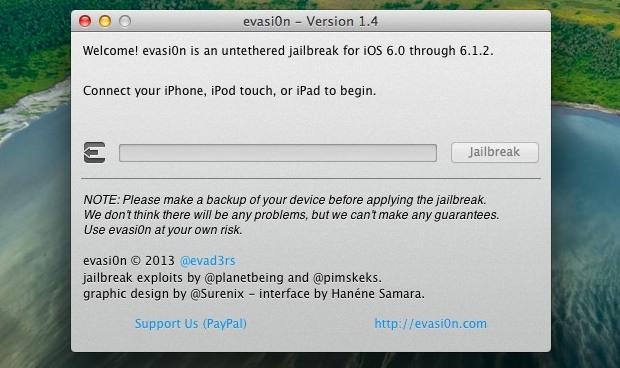
Almost immediately after iOS 6.1.2 was released with a few bug fixes for the Microsoft Exchange data use problem, a new version of the Evasi0n jailbreak utility came out to handle any devices that were upgraded to 6.1.2. It's still the same Evasi0n jailbreaking experience, untethered and all. Like prior versions of Evasion, the following devices running iOS 6.1.2 are supported: iPhone 5, iPhone 4S, iPhone 4, iPhone 3GS, iPad 2, iPad 3, iPad 4, and iPad mini, and the 4th and 5th generations of iPod touch.
Jailbreaking iOS 6.1.2
If you used evasion with iOS 6.1 when it first came out you will be familiar with the process already. The procedure is identical regardless of using an iPhone, iPad, or Windows or Mac.
- Update to iOS 6.1.2 through OTA or IPSW if you haven't done so already, either method works
- Back up your iOS device with iTunes or iCloud – this is important because it allows you to unjailbreak without losing any of your files or personal data
- Download Evasi0n 1.4 (Mac OS X) (Windows) and unzip it
- Temporarily turn off the passcode to prevent any conflicts by going to Settings > General > Passcode Lock
- Launch Evasi0n (right-click and Open in OS X, run as Administrator in Windows) and connect the iOS device to the computer using the standard USB cable
- When your device is recognized, click on "Jailbreak" to begin, the entire process takes a minute or two and is generally very fast
- Towards the end of the progress indicator, you will be told to find and tap the "Jailbreak" icon on the iOS home screen, do that when necessary
- The device will reboot itself and will be jailbroken, find the brown Cydia icon on the home screen and launch it
- Select either "User" or "Hacker" from the Cydia choices and be on your way
Don't forget to re-enable the Lock Screen passcode if you turned it off. After finishing the jailbreak, you may want to consider changing the default "alpine" password for root and mobile users for some added security as well.
Cydia is the primary outlet to the jailbreaking tweaks and app experience. There are many popular hacks and tweaks, letting you do everything ranging between removing app restrictions from 3G cellular connections to completely modifying the device lock screens to resemble something from the Android world. Many Cydia packages are free while others cost money, making Cydia very much like an underground App Store. Some ever-popular Cydia tweaks for jailbroken devices include Auxo, DashboardX, Intelliscreen, BiteSMS, Springtomize, Emblem, Stride, and MyWi, though none of those offerings are free.
Curiously, 6.1.2 is the second release of iOS since the Evasi0n jailbreak has been available, and the exploit used by the tool has still not been patched by Apple. That will likely not last much longer, whether it's 6.2 or a smaller point release, so if you do intend to jailbreak your iPhone now is probably a good time to do so.
No comments:
Post a Comment